
Can Auto Clicker Be Mapped to a Different Button? A Complete Guide
Let’s be honest—nothing ruins a gaming session or a productive flow like reaching across your keyboard for a default 'F6' key every time you need to start clicking. Whether you're trying to optimize your Minecraft setup or speeding through repetitive data entry on your phone, you've likely asked: Can an auto clicker be mapped to a different button?
The short answer is a resounding yes. In 2026, flexibility is the name of the game. Whether you want to change the 'Start' trigger to a side volume button or swap the actual clicking action from a left-click to a right-click, modern tools make it incredibly simple. In this guide, we’ll explore how mapping works and how to tailor your setup for maximum comfort.
---
Before we get into the settings, it’s important to know there are two things you can actually 'map':
1. The Trigger (The Start/Stop Button): This is the physical button you press to tell the app to begin. Instead of a clunky keyboard key, you might want this on a floating icon or a specific gesture.
2. The Action (The Output): This is what the app actually does. Most people need a standard 'Left Click,' but you can easily map it to 'Right Click' for opening menus or 'Middle Click' for specific game mechanics.
---
Customizing your buttons isn't just about being picky; it’s about working smarter and protecting your health.
---
While PC users often have to dig through complex driver settings, mobile users have it much easier. Here is how to handle mapping using Auto Clicker - Automatic Tap:

1. Enable the Floating Menu in the app permissions. 2. You can drag this menu anywhere on your screen. 3. Use the 'Play' button on the floating bar as your master trigger. This allows you to start and stop the clicking instantly, no matter what app you're currently using.
---
Avoid Screen Clutter: Place your floating trigger menu in a corner where it won't block important game UI elements like health bars or maps.
Test Before You AFK: Always run a 10-second test to make sure you've mapped the right action (Left vs. Right) before leaving your device unattended.
Use Toggles: Setting your mapping to 'Toggle' (tap once to start, once to stop) is much safer for long sessions than a 'Hold' trigger.
Mapping an auto clicker to a different button is the best way to make automation work for you. Whether you’re using a lightweight app like Auto Clicker - Automatic Tap to handle mobile grinding or professional software for your PC, the ability to customize your triggers and actions is a game-changer.
By taking a minute to map your buttons correctly, you protect your hardware from wear, save your hands from strain, and boost your efficiency to a whole new level. Why stick to the defaults when you can have a setup that’s perfectly tailored to you?
The short answer is a resounding yes. In 2026, flexibility is the name of the game. Whether you want to change the 'Start' trigger to a side volume button or swap the actual clicking action from a left-click to a right-click, modern tools make it incredibly simple. In this guide, we’ll explore how mapping works and how to tailor your setup for maximum comfort.
---
Trigger Keys vs. Click Actions: What’s the Difference?
Before we get into the settings, it’s important to know there are two things you can actually 'map':
1. The Trigger (The Start/Stop Button): This is the physical button you press to tell the app to begin. Instead of a clunky keyboard key, you might want this on a floating icon or a specific gesture.
2. The Action (The Output): This is what the app actually does. Most people need a standard 'Left Click,' but you can easily map it to 'Right Click' for opening menus or 'Middle Click' for specific game mechanics.
---
Why Customize Your Mapping?
Customizing your buttons isn't just about being picky; it’s about working smarter and protecting your health.
1. Gaming Precision
In fast-paced mobile games like Roblox or Clicker Heroes, you don't want to fumble with menus. Mapping your trigger to a convenient spot on the screen—or using a floating 'Play' button—means you can toggle automation without ever looking away from the action.2. Ergonomics & Health
Repetitive clicking is the fastest way to develop Carpal Tunnel or 'Smartphone Thumb.' Mapping the trigger to a comfortable location reduces the physical strain on your joints. It’s a small change that makes a huge difference for long-term hand health.3. Professional Workflows
If you're testing software or managing large databases, you might need to automate right-clicks to clear notifications. A tool like Auto Clicker - Automatic Tap allows you to swap these actions in seconds, turning a manual chore into a one-tap solution.---
How to Map Your Auto Clicker (The Simple Way)
While PC users often have to dig through complex driver settings, mobile users have it much easier. Here is how to handle mapping using Auto Clicker - Automatic Tap:
Step 1: Changing the Click Action
1. Open the app and go to the Settings menu. 2. Look for the option labeled 'Click Mode' or 'Button Type'. 3. Choose between Left, Right, or even Double Click. This tells the app exactly what kind of signal to send when it taps your screen.Step 2: Customizing the Trigger
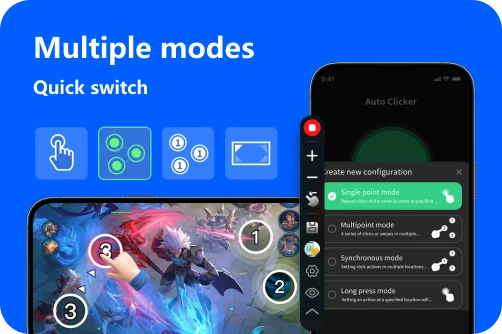
On mobile, the 'trigger' is usually a floating control panel that stays on top of your games.1. Enable the Floating Menu in the app permissions. 2. You can drag this menu anywhere on your screen. 3. Use the 'Play' button on the floating bar as your master trigger. This allows you to start and stop the clicking instantly, no matter what app you're currently using.
Step 3: Multi-Target Mapping
If you need to click multiple different spots, use the Multi-Target Mode. You can map 'Target 1' to a buy button and 'Target 2' to a menu button, creating a custom sequence that runs automatically.---
Best Practices for Mapping
Conclusion: Your Setup, Your Rules
Mapping an auto clicker to a different button is the best way to make automation work for you. Whether you’re using a lightweight app like Auto Clicker - Automatic Tap to handle mobile grinding or professional software for your PC, the ability to customize your triggers and actions is a game-changer.
By taking a minute to map your buttons correctly, you protect your hardware from wear, save your hands from strain, and boost your efficiency to a whole new level. Why stick to the defaults when you can have a setup that’s perfectly tailored to you?