
ZapTap Auto Clicker Download
ZapTap Auto Clicker is an efficient, free to download and virus-free auto clicker.
It helps you automatically click and slide on your mobile phone, tablet, and computer, improving work efficiency and reducing repetitive manual input.
and also helps you to read and browse short videos, so that you can save time to do other things!
 10M+Positive Reviews







What's special about ZapTap Auto Clicker?
Solve repeated click operation needs for application testing, office automation, data entry, and other permitted workflows.

Multi-platform available
Available for iPhone, Android, Chromebook, Windows PC and Mac. Just choose the right device and download it for free.

Custom click mode
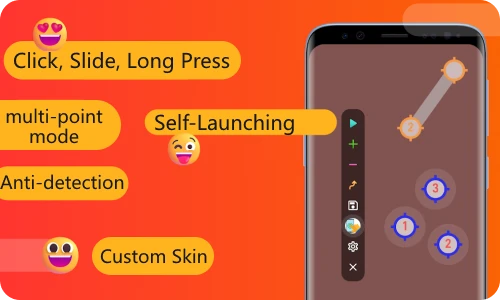
It meets various scenarios and supports multi-point mode. You can specify multiple arbitrary click points, sliding tracks, click times and time intervals.

Save/Load Scripts
Easily save and load your custom scripts for automated actions, allowing you to quickly switch between different configurations and optimize your workflow.
The core functions of ZapTap Auto Clicker
- Self-launching application:This is ideal for apps and workflows that require auto tapping in different locations
- Simultaneous Click Mode: Precisely click on multiple targets at once, perfect for complex tasks.
- Recording Mode: Capture and automate complex gestures (tap, swipe and long press) for easy playback and efficient task repetition
- Timing Mode: Configure precise click intervals for software testing, UI automation, and repetitive desktop tasks.
Applicable to all automatic clicker scenarios
Simplify tasks with automatic clicks, scrolling, swiping, form filling, hotkeys, zoom, screen and more

Game Assistant
In repeat-heavy apps and workflows, users can configure tap sequences to reduce manual fatigue and keep routine actions consistent.

Automated Office
Automatically click on the input box and fill in the preset content, suitable for batch processing of forms, data entry and other repetitive tasks.

Automated testing
Simulate user click behavior for functional testing. By recording click paths, repeatedly execute user interface operations to identify compatibility and interaction issues.

Social Media
It is suitable for scenarios such as getting likes on social media, watching videos, reading for a long time, reading novels, etc., freeing up your hands.

Web page operation
When crawling web data, automatically click the paging or expansion button to speed up the collection. Automatically click different pages at the same time to compare data, etc.

other
Suitable for repeated interface actions, scheduled checks, and other user-controlled automation workflows.
ZapTap Auto Clicker Download FAQ
ZapTap Auto Clickeris a powerful, user-friendly automation tool designed to streamline repetitive tapping tasks on your device, saving you time and effort while enhancing productivity. Whether you need to automate clicks in apps, tests, forms, or workflows, ZapTap Auto Clicker offers intuitive controls and customizable features to meet diverse needs.
Key Features
1. Dynamic & Fixed Click Modes
Choose between dynamic cursor tracking or predefined screen coordinates for precise automation. Set click intervals (as low as milliseconds) and repeat counts (finite or infinite) to suit tasks like data entry, app testing, or interface workflows.
2. Multi-Point & Gesture Support
Create complex automation sequences with multi-point clicking, swipes, and even two-finger zoom gestures. Combine actions for advanced tasks, such as navigating menus or repeating multi-step app flows.
3. No root access is required either
Operate seamlessly without needing root access. Simply enable accessibility services to start automating taps instantly.
4. Low Resource Usage
Optimized for minimal CPU and battery consumption, ensuring smooth performance even during prolonged use.
5. Floating Control Panel
Easily start, stop, or adjust settings via an intuitive overlay panel, allowing real-time adjustments without interrupting your workflow.
6. Cross-Platform Compatibility
Perfectly adapted to all devices, with configurations that automatically adjust to different screen resolutions.
Yes, ZapTap Auto Clicker is fully legalto use in most jurisdictions, provided it is employed ethically and in compliance with applicable software licenses and terms of service. Here’s why you can confidently download and use our tool:
1. Compliance with Software Licensing
ZapTap Auto Clicker operates under a transparent licensing model. Like other legitimate software, it respects end-user agreements and intellectual property laws. Our licensing terms clearly define permitted uses, ensuring you stay within legal boundaries.
2. Ethical Use Cases
The tool is designed for automation of repetitive tasks, such as data entry, software testing, interface checks, or productivity workflows. Always check platform-specific rules before deployment.
3. No Malicious Functionality
Unlike unauthorized scripts or malware, ZapTap Auto Clicker is safe, open about its operations, and free from hidden code. We prioritize user security and transparency.
4. Global Accessibility
While some regions impose restrictions on automation tools, ZapTap Auto Clicker adheres to international software distribution standards. If your country permits automation software for personal or business use, you’re good to go! For specifics, review ourRegional Compliance Guide.
Yes, ZapTap Auto Clicker is 100% safe and ad-free. It undergoes rigorous security checks to ensure compliance with app store guidelines. The tool operates without accessing sensitive user data or system files.
ZapTap Auto Clicker automates repetitive tasks with precision, including:
Productivity automation, such as repeated form steps, interface checks, and scheduled click workflows.
Streamlined app testing workflows
Customizable click intervals and patterns
What do Users Say?
This Auto Clicker is 🔥. super easy to set up custom intervals, and I can finally let my phone handle the 1,000 taps-per-minute grind while I actually live my life. I can start/stop with one tap.

Wow, I’m not usually one to leave app reviews, but I had to for this Auto Clicker. It took me 30 seconds to pick my tap area, set the interval, and boom—my tasks got done in no time.

As someone who spends hours clicking through repetitive online surveys, this Auto Clicker has saved me so much time. Customizable click intervals (down to milliseconds!), multi-point support, and a clean UI—I can queue up a series of taps .

Download ZapTap Auto Clicker
Automate click-intensive tasks like reading workflows, interface checks, software testing, and data entry to reduce repetitive strain