
Can Auto Clicker Damage Your PC? Everything You Need to Know
Let’s be honest—when you’re simulating thousands of clicks per second to dominate Cookie Clicker or breeze through data entry, a small part of you wonders: Is my PC going to explode? It’s a fair question. Your computer is an expensive investment, and pushing any piece of hardware to its limit feels risky.
The good news? In 2026, PCs are sturdier than ever. But while your processor won't catch fire, there are digital and mechanical nuances you need to understand. In this guide, we’ll dive into the real risks of auto clickers—from mouse switches to malware—and how to keep your setup in pristine condition.
---
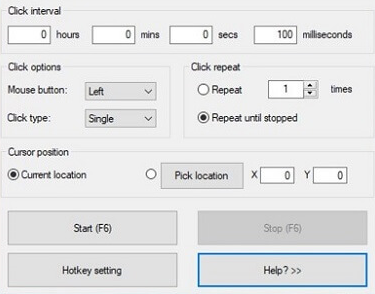
To understand the 'damage' factor, we have to look under the hood. Most modern tools, like Auto Clicker - Automatic Tap, are software-level emulators.
When you hit 'Start,' the app sends 'mouse down' and 'mouse up' signals directly to your Operating System (OS). To your PC, these digital signals are virtually indistinguishable from a physical finger press.
Because the process is primarily digital, the short answer is no—it won't break your computer's brain. But the way you use it can still impact your gear.
---
The #1 fear is wearing out the mechanical switches inside your mouse.
However, if you use a physical robotic device that literally hammers the button, you will kill your mouse in record time. For everyone else using an app, your physical mouse is 100% safe.
---
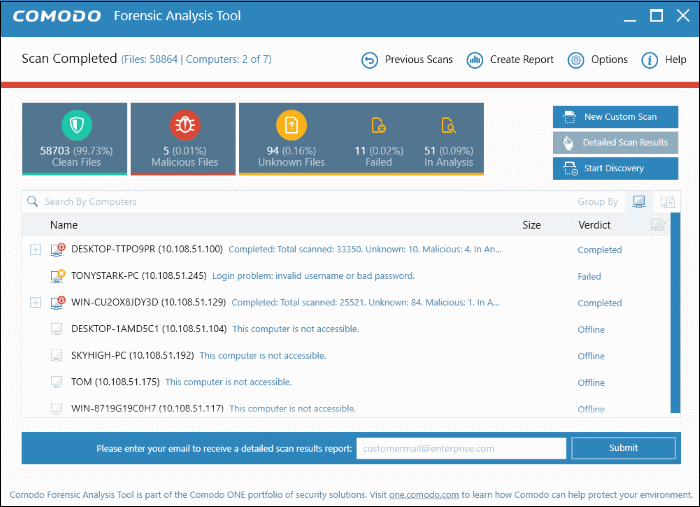
While the 'clicking' is safe, the file you download might not be. This is the biggest threat to your PC’s health.
Trojans: Giving hackers a back door into your system.
Keyloggers: Recording your passwords as you type them.
---
While not 'physical' damage, losing an account you've spent three years on is a major blow.
---
If you’re ready to start, follow this 2026 safety protocol:
1. Trust the Source: Only download reputable apps like Auto Clicker - Automatic Tap from official stores. Avoid obscure .exe files from 2012. 2. Set a Realistic Speed: Don't go for 0ms. 50ms to 100ms is the 'sweet spot' for most games and won't lag your CPU. 3. Use a Kill-Switch: Always set an emergency stop hotkey (like F6). If the clicker goes wild and starts closing your work files, you need to kill it instantly. 4. Randomize Everything: If your app allows 'jitter' or 'random delay,' turn it on. It’s your best defense against anti-cheat bans.
So, can an auto clicker damage your PC?
Physically? No. Your CPU and mouse are safe. But digitally? Yes—if you download malware or get banned for using a 'perfect' robotic pattern. Automation is a massive productivity hack, but it requires a smart pilot. Stick to reputable tools, keep your speeds human-like, and your PC will remain in perfect condition for years to come.
The good news? In 2026, PCs are sturdier than ever. But while your processor won't catch fire, there are digital and mechanical nuances you need to understand. In this guide, we’ll dive into the real risks of auto clickers—from mouse switches to malware—and how to keep your setup in pristine condition.
---
How Auto Clickers Actually Work
To understand the 'damage' factor, we have to look under the hood. Most modern tools, like Auto Clicker - Automatic Tap, are software-level emulators.
When you hit 'Start,' the app sends 'mouse down' and 'mouse up' signals directly to your Operating System (OS). To your PC, these digital signals are virtually indistinguishable from a physical finger press.
Because the process is primarily digital, the short answer is no—it won't break your computer's brain. But the way you use it can still impact your gear.
---
1. The Hardware Myth: Can It Break Your Mouse?
The #1 fear is wearing out the mechanical switches inside your mouse.
Mechanical Fatigue
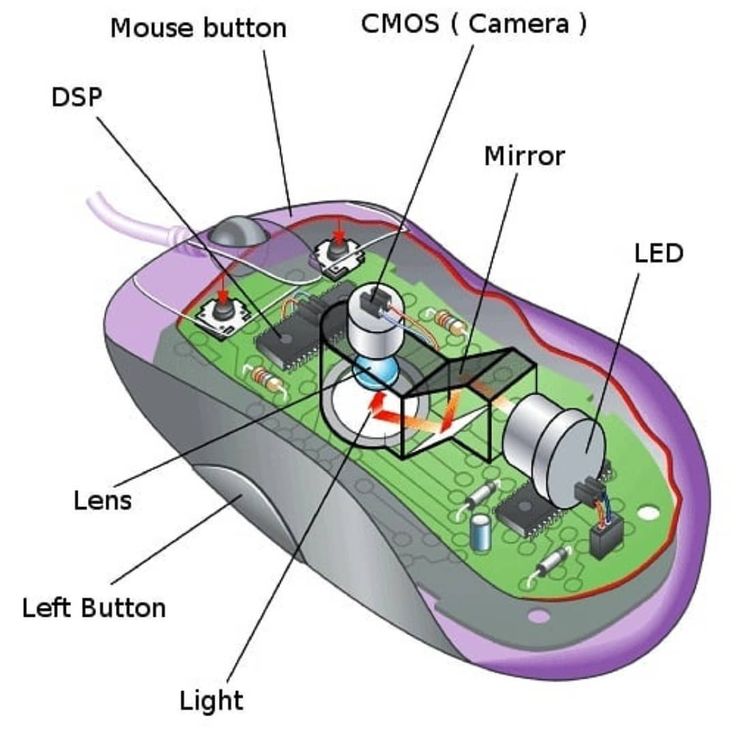
Modern gaming mice are rated for 20 million to 100 million clicks. Here’s the secret: a software auto clicker doesn't physically move the switch. The internal spring and copper leaf inside your mouse stay perfectly still. You aren't using up your mouse's 'click budget' because the hardware isn't actually moving.However, if you use a physical robotic device that literally hammers the button, you will kill your mouse in record time. For everyone else using an app, your physical mouse is 100% safe.
Thermal Impact
Can it make your PC overheat? Theoretically, your CPU works a tiny bit harder to process those thousands of 'interrupt' signals. But for a modern 2026 processor, this is like an elephant carrying a feather. Unless your cooling system is completely broken, the heat impact is zero.---
2. Software Risks: Where the Real Danger Hides
While the 'clicking' is safe, the file you download might not be. This is the biggest threat to your PC’s health.
The Malware Trap
Searching for 'free auto clickers' on random forums is a gamble. Shady developers often hide 'parting gifts' inside their apps:System Stability & Lag
If you set a clicker to 0ms (infinite speed), you might overwhelm the app you're using. This leads to Input Lag, where your PC becomes unresponsive because it’s too busy processing the automated clicks to listen to your actual hand movements.---
3. Digital Damage: Bans and Policy
While not 'physical' damage, losing an account you've spent three years on is a major blow.
The 'Ban Hammer'
Competitive games like Valorant or Warzone use kernel-level anti-cheat (like Vanguard). They look for 'inhuman' patterns. If you click exactly every 10.0ms for five hours, you're a bot in their eyes. To stay safe, always use a tool like Auto Clicker - Automatic Tap that offers Randomized Intervals to mimic a human's natural inconsistency.---
Step-by-Step: How to Automate Safely
If you’re ready to start, follow this 2026 safety protocol:
1. Trust the Source: Only download reputable apps like Auto Clicker - Automatic Tap from official stores. Avoid obscure .exe files from 2012. 2. Set a Realistic Speed: Don't go for 0ms. 50ms to 100ms is the 'sweet spot' for most games and won't lag your CPU. 3. Use a Kill-Switch: Always set an emergency stop hotkey (like F6). If the clicker goes wild and starts closing your work files, you need to kill it instantly. 4. Randomize Everything: If your app allows 'jitter' or 'random delay,' turn it on. It’s your best defense against anti-cheat bans.
Conclusion: The Verdict
So, can an auto clicker damage your PC?
Physically? No. Your CPU and mouse are safe. But digitally? Yes—if you download malware or get banned for using a 'perfect' robotic pattern. Automation is a massive productivity hack, but it requires a smart pilot. Stick to reputable tools, keep your speeds human-like, and your PC will remain in perfect condition for years to come.