
Can Auto Clickers Have Multiple Click Positions? The Ultimate Guide to Multi-Target Automation
In the world of digital productivity and mobile gaming, efficiency is everything. Whether you are trying to automate a repetitive data entry task or looking to stay ahead in a click-heavy simulator, the tools you use make all the difference. One of the most common questions in 2026 is: Can auto clickers have multiple click positions?
The short answer is a resounding yes. Modern auto clickers have evolved far beyond simple tools that tap a single spot. Today, multi-target automation allows users to create complex sequences that mimic human behavior with surgical precision. In this comprehensive guide, we will explore how these tools work, why they are essential for modern workflows, and how you can set up your own multi-position routine.
---
A standard auto clicker is designed to automate a single tap at a fixed location. While useful for basic needs, it falls short when you need to interact with multiple buttons, menus, or fields in a specific order.
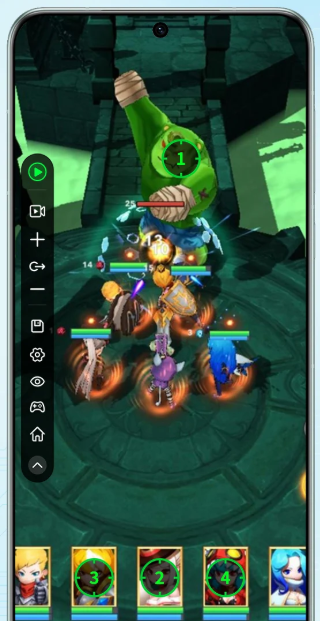
A multi-target auto clicker, like Auto Clicker - Automatic Tap, allows you to define a sequence of different X and Y coordinates on your screen. The software then cycles through these points, clicking each one based on a custom schedule. This functionality turns a simple utility into a powerful macro engine capable of handling sophisticated mobile and desktop tasks.
The ability to automate multiple points on a screen opens up a world of possibilities across various industries and hobbies in 2026.
Upgrading different heroes or structures simultaneously.
Navigating through multi-layered menu systems to sell items.
Casting a sequence of spells or skills that require tapping different icons.
Staying active in a server while performing various in-game 'check-ins.'
---
When choosing a tool for multiple positions in 2026, look for these advanced features:
---
Setting up a multi-target sequence is straightforward. Here is how to do it using Auto Clicker - Automatic Tap:
1. Select Multi-Target Mode: Open the app and toggle from 'Single Target' to 'Multi-Target Mode.' 2. Add Your Targets: Use the floating toolbar’s plus (+) icon to add your first target. Drag the numbered icon to your first button. 3. Configure Each Point: Tap the numbered icon to set the click interval (e.g., 200ms) and the click duration. 4. Build Your Sequence: Continue adding targets (2, 3, 4...) in the order you need them to activate. 5. Test and Run: Do a 'dry run' to ensure the timing matches the screen's animations, then hit Play.
To answer the original question: Yes, auto clickers can absolutely have multiple click positions. In 2026, multi-target functionality is what separates a basic tapper from a professional automation tool. By mastering these sequences, you can eliminate the boredom of repetitive tasks and focus on the strategy of your favorite games or the creative parts of your work. Download a reputable tool like Auto Clicker - Automatic Tap today and let your device do the heavy lifting!
The short answer is a resounding yes. Modern auto clickers have evolved far beyond simple tools that tap a single spot. Today, multi-target automation allows users to create complex sequences that mimic human behavior with surgical precision. In this comprehensive guide, we will explore how these tools work, why they are essential for modern workflows, and how you can set up your own multi-position routine.
---
What is a Multi-Target Auto Clicker?
A standard auto clicker is designed to automate a single tap at a fixed location. While useful for basic needs, it falls short when you need to interact with multiple buttons, menus, or fields in a specific order.
A multi-target auto clicker, like Auto Clicker - Automatic Tap, allows you to define a sequence of different X and Y coordinates on your screen. The software then cycles through these points, clicking each one based on a custom schedule. This functionality turns a simple utility into a powerful macro engine capable of handling sophisticated mobile and desktop tasks.
Why Use Multiple Click Positions?
The ability to automate multiple points on a screen opens up a world of possibilities across various industries and hobbies in 2026.
1. Mobile Gaming & Simulators
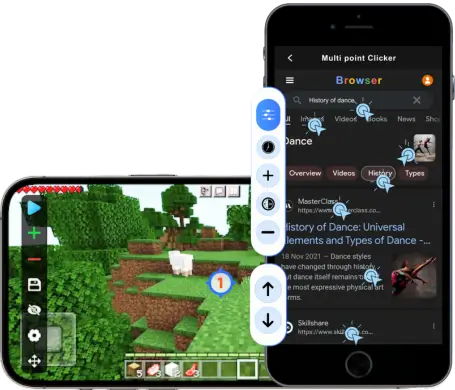
For gamers playing titles like Roblox, Clicker Heroes, or Bee Swarm Simulator, multi-position clicking is a game-changer. You can automate:2. Software Testing and Quality Assurance
Developers use multi-position automation for regression testing. Instead of manually tapping through a new user registration form dozens of times, an auto clicker can be programmed to tap each text field, navigate dropdowns, and hit 'Submit' automatically.3. Data Entry & Form Filling
In a professional setting, many legacy systems require users to move data across windows. A multi-target tool can be set up to tap a field, paste data, move to the next field, and confirm—saving hours of manual labor and reducing physical strain.---
Key Features of Multi-Position Auto Clickers
When choosing a tool for multiple positions in 2026, look for these advanced features:
Visual Coordinate Mapping
The software should allow you to "pick" points visually. In apps like Auto Clicker - Automatic Tap, this usually involves a floating menu where you hit a plus (+) button to drop numbered targets onto your screen, representing the click order.Independent Timing Control
Not every click needs to happen at the same speed. A high-quality clicker allows you to set a 100ms delay for Target 1, but a 3-second delay for Target 2 to allow for page loading or animations.Script Saving & Cloud Backup
Setting up twenty different positions is time-consuming. Ensure your tool can save these 'scripts' or configurations. Modern 2026 updates, like those in Auto Clicker - Automatic Tap, even offer Google Drive backup to sync your scripts across devices.---
How to Set Up Multiple Click Positions: Step-by-Step
Setting up a multi-target sequence is straightforward. Here is how to do it using Auto Clicker - Automatic Tap:
1. Select Multi-Target Mode: Open the app and toggle from 'Single Target' to 'Multi-Target Mode.' 2. Add Your Targets: Use the floating toolbar’s plus (+) icon to add your first target. Drag the numbered icon to your first button. 3. Configure Each Point: Tap the numbered icon to set the click interval (e.g., 200ms) and the click duration. 4. Build Your Sequence: Continue adding targets (2, 3, 4...) in the order you need them to activate. 5. Test and Run: Do a 'dry run' to ensure the timing matches the screen's animations, then hit Play.
Conclusion: Efficiency Redefined
To answer the original question: Yes, auto clickers can absolutely have multiple click positions. In 2026, multi-target functionality is what separates a basic tapper from a professional automation tool. By mastering these sequences, you can eliminate the boredom of repetitive tasks and focus on the strategy of your favorite games or the creative parts of your work. Download a reputable tool like Auto Clicker - Automatic Tap today and let your device do the heavy lifting!