
Can I Make Xbox One Controller Auto Click? A Comprehensive Guide to Controller Automation
In the world of gaming, efficiency is often the key to progression. Whether you're grinding for materials in Minecraft, surviving endless waves in an ARPG, or bypassing repetitive menu clicking, the question arises: Can I make my Xbox One controller auto click?
The short answer is yes. In 2026, the methods have become more streamlined, though they still depend heavily on whether you're playing on an Xbox console or a PC. While a mouse is easy to automate, a controller requires specific software mapping or hardware. In this guide, we’ll explore how to master controller automation and why apps like Auto Clicker - Automatic Tap are changing the game for mobile and emulated play.
---
Automation is a powerful 'quality of life' tool in 2026 for:Rapid Fire: Reaching the maximum fire rate on semi-auto weapons without the finger strain.
AFK Farming: Performing repetitive tasks in RPGs like Starfield or Elder Scrolls Online while away from the screen.
Accessibility: Helping players with physical limitations who find repeated button mashing difficult or painful.
Menu Navigation: Automating tedious inventory management in complex strategy games.
---
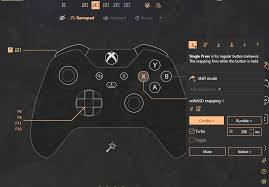
If you use your Xbox One controller on a Windows PC, you have the most flexibility. Since Windows 11/12 recognizes the controller as a standard HID (Human Interface Device), you can use remapper software to turn any button into an auto-clicker.
1. Turbo Feature: Set a button (like 'RT') to "Turbo." As long as you hold it, the software registers repeated presses at your chosen frequency.
2. Toggle Feature: Set a "Toggle" so you can press 'A' once, and the controller will click indefinitely until you tap it again.
---
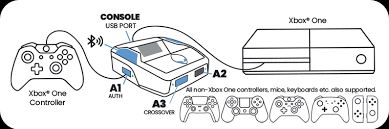
Xbox consoles (One, Series X|S) are closed systems. You cannot install a background app to click for you. To automate on a console, you need external hardware.
Note: In 2026, Xbox has tightened its 'unauthorized accessory' policy. Always ensure your hardware is firmware-updated to avoid the '0x82d60002' blocking error.
---
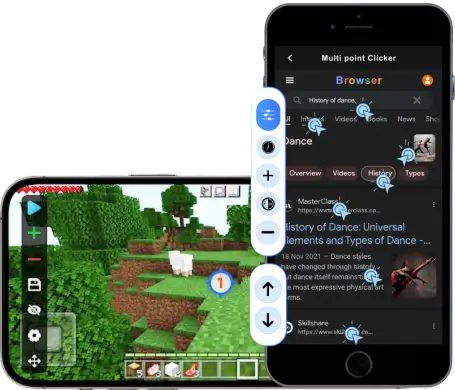
For many gamers in 2026, the 'Xbox experience' happens on mobile via Cloud Gaming or on PC emulators. In these scenarios, you don't need complex hardware.
Apps like Auto Clicker - Automatic Tap allow you to place a floating target over the on-screen controls. When you use your Xbox controller on your phone, the app can handle the rapid-fire tapping on the touch-overlay, effectively giving you 'Rapid Fire' without needing to mod your controller or use expensive PC software.
---
While automating is possible, you must be careful in multiplayer environments:Anti-Cheat Systems: Games like Call of Duty use Ricochet anti-cheat. If it detects a perfectly consistent clicking interval (e.g., exactly 50ms every time), it may flag you for macros. Always use the Randomize feature in your software to add human-like jitter.
Console Bans: Using hardware like Cronus Zen in competitive ranked play is increasingly being targeted by developers as an unfair advantage.
Can you make an Xbox One controller auto click? Absolutely. On PC, tools like reWASD or Steam Input are the best low-cost options. On mobile, Auto Clicker - Automatic Tap provides a brilliant workaround for Cloud Gaming. On consoles, you'll need to invest in hardware like a Cronus Zen or a modded controller.
Always use these tools responsibly—stick to single-player or cooperative games to avoid account risks, and enjoy a more relaxed, automated gaming experience!
The short answer is yes. In 2026, the methods have become more streamlined, though they still depend heavily on whether you're playing on an Xbox console or a PC. While a mouse is easy to automate, a controller requires specific software mapping or hardware. In this guide, we’ll explore how to master controller automation and why apps like Auto Clicker - Automatic Tap are changing the game for mobile and emulated play.
---
Why Automate an Xbox One Controller?
Automation is a powerful 'quality of life' tool in 2026 for:
---
Method 1: Software Solutions (Best for PC Users)
If you use your Xbox One controller on a Windows PC, you have the most flexibility. Since Windows 11/12 recognizes the controller as a standard HID (Human Interface Device), you can use remapper software to turn any button into an auto-clicker.
Using reWASD
reWASD remains the gold standard for controller customization. It allows you to assign mouse or keyboard actions to any Xbox button.1. Turbo Feature: Set a button (like 'RT') to "Turbo." As long as you hold it, the software registers repeated presses at your chosen frequency.
2. Toggle Feature: Set a "Toggle" so you can press 'A' once, and the controller will click indefinitely until you tap it again.
Using Steam Input
If you play through Steam, you have a built-in auto-clicker. Go to Controller Configuration > Show Activators and turn on Repeat Rate (Turbo). This is 100% free and works across thousands of games.---
Method 2: Hardware Adapters (Best for Console Users)
Xbox consoles (One, Series X|S) are closed systems. You cannot install a background app to click for you. To automate on a console, you need external hardware.
Cronus Zen and Strike Packs
Devices like the Cronus Zen sit between your controller and the console. They allow you to run scripts for rapid fire or recoil control.Note: In 2026, Xbox has tightened its 'unauthorized accessory' policy. Always ensure your hardware is firmware-updated to avoid the '0x82d60002' blocking error.
---
Automation for Mobile & Emulators: Auto Clicker - Automatic Tap
For many gamers in 2026, the 'Xbox experience' happens on mobile via Cloud Gaming or on PC emulators. In these scenarios, you don't need complex hardware.
Apps like Auto Clicker - Automatic Tap allow you to place a floating target over the on-screen controls. When you use your Xbox controller on your phone, the app can handle the rapid-fire tapping on the touch-overlay, effectively giving you 'Rapid Fire' without needing to mod your controller or use expensive PC software.
---
The Risks: Bans and Ethics
While automating is possible, you must be careful in multiplayer environments:
Conclusion
Can you make an Xbox One controller auto click? Absolutely. On PC, tools like reWASD or Steam Input are the best low-cost options. On mobile, Auto Clicker - Automatic Tap provides a brilliant workaround for Cloud Gaming. On consoles, you'll need to invest in hardware like a Cronus Zen or a modded controller.
Always use these tools responsibly—stick to single-player or cooperative games to avoid account risks, and enjoy a more relaxed, automated gaming experience!