
Can Roblox Ban You for Using an Auto Clicker? The Ultimate Guide for 2026
If you have ever spent hours grinding in a Roblox simulator or trying to stay active to avoid being kicked for inactivity, you have likely considered using an auto clicker. These simple automation tools save your fingers from repetitive strain and help you progress while you are away from your keyboard (AFK). However, the burning question remains: Can Roblox ban you for using an auto clicker?
In this comprehensive 2026 guide, we will dive into the specifics of Roblox’s latest Terms of Service, how the Hyperion (Byfron) anti-cheat system has evolved, and the best practices to keep your account safe.
---
The technical answer is yes, but with caveats. According to the Roblox Terms of Service (updated April 30, 2026), the use of third-party software to automate gameplay is a violation. However, Roblox rarely issues global platform bans for simple external auto clickers.
The risk depends on two factors: the specific game's anti-cheat scripts and whether you are using the tool for an 'Unfair Advantage' in competitive modes. While a simulator might ignore your auto clicker, a high-stakes PvP game might flag you instantly.
---
Roblox’s 2026 community standards emphasize 'fair play' and 'integrity.' While they have simplified language regarding AI-based tools and UGC, the core stance on cheating remains firm.
---
Roblox’s security, powered by **Hyperion**, has significantly upgraded its behavioral detection this year.
---
If you choose to use an auto clicker, follow these safety steps to minimize your risk:
---
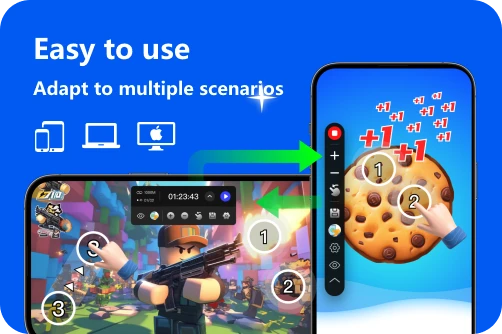
1. Select Your Tool: Use a trusted app like Auto Clicker - Automatic Tap if you are on mobile or using an emulator. 2. Interval Settings: Set the frequency to no more than 10-15 clicks per second ($100ms$ or higher). 3. Randomization: Add at least a $20ms$ 'jitter' to the timing. 4. Test in Private: If the game has free private servers, use them. This removes the risk of other players reporting you for suspicious behavior.
Can Roblox ban you for an auto clicker? Yes, but it's rare for global accounts. Most bans are 'Experience Bans' issued by individual game creators. By using reputable software, human-like speeds, and avoiding competitive PvP leaderboards, you can enjoy the benefits of automation without losing your 2026 progress. Automate responsibly!
In this comprehensive 2026 guide, we will dive into the specifics of Roblox’s latest Terms of Service, how the Hyperion (Byfron) anti-cheat system has evolved, and the best practices to keep your account safe.
---
The Short Answer: Is It Bannable?
The technical answer is yes, but with caveats. According to the Roblox Terms of Service (updated April 30, 2026), the use of third-party software to automate gameplay is a violation. However, Roblox rarely issues global platform bans for simple external auto clickers.
The risk depends on two factors: the specific game's anti-cheat scripts and whether you are using the tool for an 'Unfair Advantage' in competitive modes. While a simulator might ignore your auto clicker, a high-stakes PvP game might flag you instantly.
---
Understanding Roblox's 2026 Terms of Service
Roblox’s 2026 community standards emphasize 'fair play' and 'integrity.' While they have simplified language regarding AI-based tools and UGC, the core stance on cheating remains firm.
Exploits vs. Macros
Typically, Roblox views exploits as software that injects code into the game (like Volt or Vape) to fly or wall-hack. A standard auto clicker is a macro; it operates at the OS level and doesn't 'touch' the Roblox code. This distinction often keeps auto clickers in a 'low-priority' category for global bans, though they are still technically unauthorized.---
How Roblox Detects Auto Clickers in 2026
Roblox’s security, powered by **Hyperion**, has significantly upgraded its behavioral detection this year.
1. Hyperion Anti-Cheat Updates
Hyperion now monitors system-level inputs more closely. In early 2026, many developers noted that Hyperion could flag unauthorized software even in 'edit-enabled' experiences. If an auto clicker uses virtual mouse drivers that Hyperion doesn't recognize, it may trigger a client kick or a temporary suspension.2. Behavioral AI Analysis
Even if the software is 'hidden,' your pattern isn't. If you click exactly 10 times per second ($100ms$ interval) for 6 hours with $0.00ms$ of variance, the server-side AI knows you aren't human. Real human clicking has 'jitter' or natural timing fluctuations.3. Experience-Specific Bans
Individual game developers (e.g., *Royale High* or *Adopt Me!*) have their own detection systems. You might receive an 'Experience Ban'—where you are blocked from one specific game—while your main Roblox account remains active.---
How to Use an Auto Clicker Safely (2026 Best Practices)
If you choose to use an auto clicker, follow these safety steps to minimize your risk:
1. Use a Reputable, Non-Invasive Tool
Stick to well-known tools like **OP Auto Clicker** or the mobile-ready Auto Clicker - Automatic Tap. These tools are designed to simulate hardware inputs rather than injecting code into the Roblox process.2. Enable Randomization (The 'Human' Factor)
Most 2026 auto clickers feature a Randomize setting. Instead of a fixed $100ms$ interval, set a range (e.g., $95ms$ to $115ms$). This variance makes your activity look like a human finger and is much harder for AI-based filters to catch.3. Limit Your AFK Sessions
Avoid staying AFK for 24+ hours. Use the tool in 2-3 hour bursts. If a developer issues a manual 'AFK Check' (like a pop-up) and you don't respond while still clicking, you are guaranteed a report and a ban.---
Step-by-Step: Setting Up a Safe Workflow
1. Select Your Tool: Use a trusted app like Auto Clicker - Automatic Tap if you are on mobile or using an emulator. 2. Interval Settings: Set the frequency to no more than 10-15 clicks per second ($100ms$ or higher). 3. Randomization: Add at least a $20ms$ 'jitter' to the timing. 4. Test in Private: If the game has free private servers, use them. This removes the risk of other players reporting you for suspicious behavior.
Conclusion: The Final Verdict
Can Roblox ban you for an auto clicker? Yes, but it's rare for global accounts. Most bans are 'Experience Bans' issued by individual game creators. By using reputable software, human-like speeds, and avoiding competitive PvP leaderboards, you can enjoy the benefits of automation without losing your 2026 progress. Automate responsibly!