
Can I Auto Click Hearts on TikTok Lives? A Complete Guide to Automation
If you have spent any time watching TikTok Lives, you know the drill: the screen is a flurry of floating hearts and gifts. For viewers, tapping that screen is a way to show support. For creators, those hearts are a signal to the TikTok algorithm that the stream is 'sticky,' helping push the broadcast to the 'For You' Page (FYP).

However, manually tapping your screen for 20 minutes straight can lead to a very sore thumb. This leads many to wonder: Can I auto click hearts on TikTok lives?
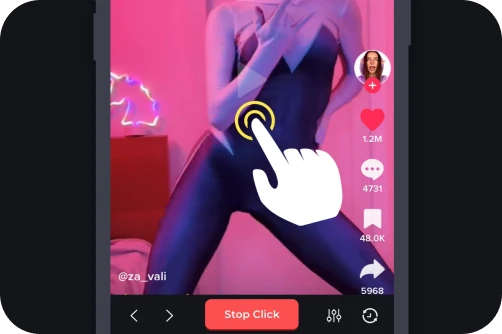
The short answer in 2026 is yes. Using automation tools to send likes is a common practice, but there are technical hurdles and platform rules you need to understand. In this guide, we’ll explore how to set up an auto clicker for TikTok on Android, iOS, and PC while staying safe.
---
Why bother automating a simple double-tap? In 2026, the TikTok ecosystem is more competitive than ever:
1. Algorithmic Boost: High-frequency hearts suggest captivating content, prompting TikTok to suggest the Live to a wider audience.
2. Hitting Milestones: Dedicated fans use auto clickers to help influencers reach massive 'Like' goals (e.g., 'Let's hit 10 million likes!').
3. Gamification: Many creators trigger specific 'stunts' or shoutouts once a certain heart threshold is met.
4. Efficiency: It allows you to support a stream while multitasking without physically interacting with your device.
---
Recommended Tool: Auto Clicker - Automatic Tap.
Setup Steps:Download: Get the app from the official Google Play Store.
Accessibility Permissions: Enable this so the app can simulate taps on your screen.
Configure Settings: Set the interval. For TikTok, 50ms to 100ms is the 'sweet spot.' Going faster (like 1ms) can lag your phone or trigger TikTok's 'spam' filters.
Position Target: Open TikTok Live and drag the floating target to the center of the video area.
Enable Randomization: Use the built-in Randomize feature to vary the tap timing slightly. This mimics a human finger and keeps your account safer.
Setup Steps:Settings: Go to Accessibility > Switch Control > Recipes.
Record: Create a 'TikTok Hearts' recipe. Select Assign a Switch > Full Screen > Custom Gesture and record yourself tapping the screen rapidly.
Launch: Assign the recipe to the Accessibility Shortcut (triple-click side button).
Use: Open TikTok Live, triple-click the side button, and tap once to play back your sequence of clicks.
---
TikTok’s Terms of Service prohibit 'artificial engagement.' If the system detects inhuman speeds (e.g., 500+ likes per second), you might get shadowbanned. This means your likes won't actually count toward the creator's total, even if you see them on your screen.
How to Stay Safe:Don't Overclock: Stick to a realistic speed (around 10-20 taps per second).
The 15-Minute Rule: Use the auto clicker in short bursts. Tapping for 5 hours straight is a major red flag for bot-detection algorithms.
Keep it Human: Occasionally send a comment or a gift manually to prove there is a real person behind the account.
So, can you auto click hearts on TikTok lives? Absolutely. Whether you are an Android user using Auto Clicker - Automatic Tap or an iPhone user mastering Switch Control, automation is within reach.
By keeping your click rates within a 'human-plus' range and using randomization, you can help your favorite creators reach the 'For You' page without putting your account at risk. Start supporting your community more efficiently today!
However, manually tapping your screen for 20 minutes straight can lead to a very sore thumb. This leads many to wonder: Can I auto click hearts on TikTok lives?
The short answer in 2026 is yes. Using automation tools to send likes is a common practice, but there are technical hurdles and platform rules you need to understand. In this guide, we’ll explore how to set up an auto clicker for TikTok on Android, iOS, and PC while staying safe.
---
Why Do People Auto Click Hearts on TikTok?
Why bother automating a simple double-tap? In 2026, the TikTok ecosystem is more competitive than ever:
1. Algorithmic Boost: High-frequency hearts suggest captivating content, prompting TikTok to suggest the Live to a wider audience.
2. Hitting Milestones: Dedicated fans use auto clickers to help influencers reach massive 'Like' goals (e.g., 'Let's hit 10 million likes!').
3. Gamification: Many creators trigger specific 'stunts' or shoutouts once a certain heart threshold is met.
4. Efficiency: It allows you to support a stream while multitasking without physically interacting with your device.
---
How to Auto Click Hearts on TikTok: 2026 Guide
1. Auto Clicking on Android (Most Effective)
Android remains the most flexible platform for automation. You can use a dedicated app to handle the tapping while you enjoy the show.Recommended Tool: Auto Clicker - Automatic Tap.
Setup Steps:
2. Auto Clicking on iOS (iPhone/iPad)
Apple is stricter, so you won't find a 'one-tap' clicker app. Instead, use the built-in Switch Control.Setup Steps:
---
Is It Safe? Avoiding the 'Shadowban'
TikTok’s Terms of Service prohibit 'artificial engagement.' If the system detects inhuman speeds (e.g., 500+ likes per second), you might get shadowbanned. This means your likes won't actually count toward the creator's total, even if you see them on your screen.
How to Stay Safe:
Conclusion: Support Smarter
So, can you auto click hearts on TikTok lives? Absolutely. Whether you are an Android user using Auto Clicker - Automatic Tap or an iPhone user mastering Switch Control, automation is within reach.
By keeping your click rates within a 'human-plus' range and using randomization, you can help your favorite creators reach the 'For You' page without putting your account at risk. Start supporting your community more efficiently today!