
Can Mobile Get an Auto Clicker? The Ultimate Guide for Android and iOS
In the fast-paced world of mobile gaming and high-efficiency app usage, users are constantly looking for ways to streamline their experience. One of the most common questions is: 'Can mobile get an auto clicker?'
The answer in 2026 is a definitive yes. Whether you're farming resources in an RPG or automating repetitive tasks, mobile automation has become more accessible than ever. However, the process varies significantly between Android's open ecosystem and Apple's secure 'walled garden.' In this 2026 update, we explore the latest tools and native features to help you automate safely.
---
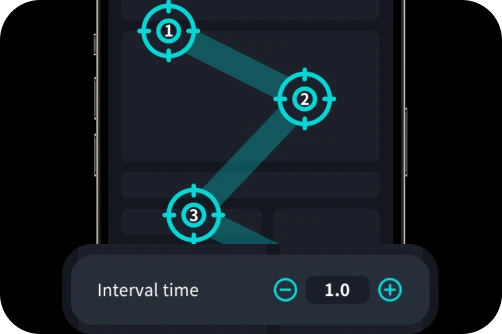
A mobile auto clicker is an app or system feature that simulates finger taps. In 2026, these tools have evolved beyond simple clicking; they now support Multi-Target Mode, swipe gestures, and even image recognition to trigger actions. Because these tools interact with the OS interface, they require specific permissions—usually 'Accessibility Services' on Android or 'Switch Control' on iOS.
---
Android remains the leader in mobile automation due to its flexible architecture. Users can download dedicated apps that offer a floating control panel for real-time adjustments.
1. Download a Reputable App: Search the Google Play Store for Auto Clicker - Automatic Tap. This remains the gold standard for its clean UI and lack of intrusive ads.
2. Enable Accessibility Permissions: Once installed, you must grant the app permission to 'draw over other apps.' This allows the clicking 'targets' to stay visible over your game.
3. Configure Your Mode:Single Target: Best for basic clicking games (e.g., Cookie Clicker).
Multi-Target: Essential for complex games like Roblox or Raid: Shadow Legends where you need to click multiple buttons in a sequence.
4. In 2026, many games use behavioral AI. Instead of 100ms, set a range (e.g., 100ms to 150ms) to mimic human variance.
---
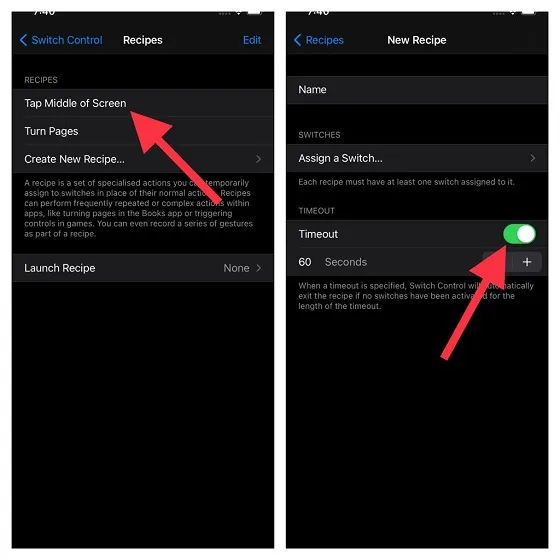
Apple’s iOS still prohibits third-party apps from clicking inside other apps. However, the built-in Switch Control feature has become more robust in iOS 19/20, allowing for surprisingly effective 'native' auto-clicking.
1. Create a Recipe: Go to Settings > Accessibility > Switch Control > Recipes. Create a new recipe called 'Auto Clicker.'
2. Assign a Gesture: Choose Assign a Switch > Full Screen > Custom Gesture. Tap the screen rapidly where you want the clicks to occur and save.
3. Set the Shortcut: Under Accessibility Shortcut, ensure Switch Control is selected.
4. Activate: Triple-click the side button in your game. Each tap you perform will now queue a cycle of recorded clicks. In 2026, iOS users often use this to stay active in 'AFK' environments.
---
Game Bans: Major 2026 titles like Genshin Impact or PUBG Mobile use kernel-level or behavioral anti-cheats. If you click with 100% rhythmic perfection, you risk a permanent ban. Always use randomization features if your app provides them.
Device Health: Running high-speed scripts for hours causes significant heat. Keep your device on a cool surface and reduce screen brightness to 10% to preserve battery life.
Security Caution: Never download 'Modded APKs' for auto clickers. Only use apps from the official Google Play Store to ensure your personal data stays private.
Can mobile get an auto clicker? Yes. Android offers the most power through apps like Auto Clicker - Automatic Tap, while iOS provides a safe, native alternative via Switch Control. By using these tools responsibly and avoiding competitive multiplayer modes, you can take the 'grind' out of your favorite mobile experiences. Happy clicking!
The answer in 2026 is a definitive yes. Whether you're farming resources in an RPG or automating repetitive tasks, mobile automation has become more accessible than ever. However, the process varies significantly between Android's open ecosystem and Apple's secure 'walled garden.' In this 2026 update, we explore the latest tools and native features to help you automate safely.
---
Understanding the 2026 Mobile Auto Clicker
A mobile auto clicker is an app or system feature that simulates finger taps. In 2026, these tools have evolved beyond simple clicking; they now support Multi-Target Mode, swipe gestures, and even image recognition to trigger actions. Because these tools interact with the OS interface, they require specific permissions—usually 'Accessibility Services' on Android or 'Switch Control' on iOS.
---
Can Android Get an Auto Clicker?
Android remains the leader in mobile automation due to its flexible architecture. Users can download dedicated apps that offer a floating control panel for real-time adjustments.
How to Get an Auto Clicker on Android (2026 Guide)
1. Download a Reputable App: Search the Google Play Store for Auto Clicker - Automatic Tap. This remains the gold standard for its clean UI and lack of intrusive ads.
2. Enable Accessibility Permissions: Once installed, you must grant the app permission to 'draw over other apps.' This allows the clicking 'targets' to stay visible over your game.
3. Configure Your Mode:
4. In 2026, many games use behavioral AI. Instead of 100ms, set a range (e.g., 100ms to 150ms) to mimic human variance.
---
Can iPhone (iOS) Get an Auto Clicker?
Apple’s iOS still prohibits third-party apps from clicking inside other apps. However, the built-in Switch Control feature has become more robust in iOS 19/20, allowing for surprisingly effective 'native' auto-clicking.
How to Use iOS Switch Control as an Auto Clicker
1. Create a Recipe: Go to Settings > Accessibility > Switch Control > Recipes. Create a new recipe called 'Auto Clicker.'
2. Assign a Gesture: Choose Assign a Switch > Full Screen > Custom Gesture. Tap the screen rapidly where you want the clicks to occur and save.
3. Set the Shortcut: Under Accessibility Shortcut, ensure Switch Control is selected.
4. Activate: Triple-click the side button in your game. Each tap you perform will now queue a cycle of recorded clicks. In 2026, iOS users often use this to stay active in 'AFK' environments.
---
Risks: Bans, Battery, and Security
Conclusion
Can mobile get an auto clicker? Yes. Android offers the most power through apps like Auto Clicker - Automatic Tap, while iOS provides a safe, native alternative via Switch Control. By using these tools responsibly and avoiding competitive multiplayer modes, you can take the 'grind' out of your favorite mobile experiences. Happy clicking!