
Can You Get an Auto Clicker on PS5? The Ultimate Guide to Console Automation
For many gamers, the PlayStation 5 (PS5) represents the pinnacle of modern console gaming. However, even the best games often come with a repetitive side: the grind. Whether you are farming currency in an RPG or trying to stay active in a Roblox lobby, you might find yourself asking: "Can u get auto clicker on ps5?"
The answer in 2026 is: No, there is no native app, but there are powerful workarounds. Because the PS5 operates on a closed, proprietary system, you cannot download a simple clicking app from the PlayStation Store. In this guide, we will break down the most effective ways to automate your PS5 gameplay safely.
---
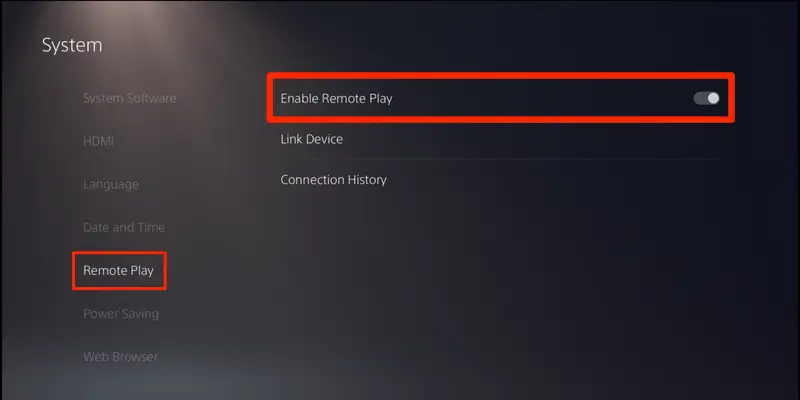
The most reliable way to use an auto clicker on a PS5 is via PS Remote Play. This method uses your PC or Mac as a bridge, allowing you to use high-end desktop automation software on your console.
Pro Tip: In 2026, many users use reWASD software to map mouse clicks to specific DualSense button outputs for complex AFK loops.

---
If you want a plug-and-play solution without a PC, Turbo Controllers are the answer. Many licensed third-party controllers (like those from HORI) feature a built-in 'Turbo' function.
The console recognizes this input as originating from an authentic controller, making it the safest method for avoiding account suspension.
Physical Automation: You can set a button (like 'X') to 'Auto-Turbo,' meaning the controller will continue to signal the button press even after you let go.
---
Devices like the Cronus Zen allow you to run custom scripts on your PS5. While powerful, Sony frequently updates the PS5 firmware to block these devices. In 2026, using these in competitive multiplayer games (like Call of Duty or Apex Legends) carries a high risk of a permanent hardware ban.
---
1. Prepare the Connection: Ensure your PS5 is on a wired Ethernet connection for zero-lag input. 2. Configure PC Tool: Set your PC auto clicker to a 'Human-like' interval (e.g., 100ms to 500ms) to avoid triggering in-game bot detection. 3. Positioning: Place your mouse cursor over the specific in-game button in the Remote Play window (e.g., the 'Confirm' button in an RPG menu). 4. Start the Loop: Use your hotkey to begin. Your PC will now 'power' the clicks on your PS5 indefinitely.
---
Single-Player Games: Generally 100% safe. Sony does not monitor input patterns in offline environments.
Online Multiplayer: High risk. If a game like Destiny 2 detects perfectly rhythmic inputs for 10 hours straight, their behavioral AI will flag you for botting.
Hardware Bans: Using unauthorized third-party 'cheat' adapters can result in your console's unique ID being blacklisted from PSN.
So, can u get auto clicker on ps5? While a native app doesn't exist, the Remote Play + PC Clicker combo is the gold standard for automation in 2026. Whether you're farming XP or avoiding an AFK kick, always prioritize randomized click intervals to keep your account safe. Happy farming!
The answer in 2026 is: No, there is no native app, but there are powerful workarounds. Because the PS5 operates on a closed, proprietary system, you cannot download a simple clicking app from the PlayStation Store. In this guide, we will break down the most effective ways to automate your PS5 gameplay safely.
---
Method 1: The Remote Play Workaround (Best for 2026)
The most reliable way to use an auto clicker on a PS5 is via PS Remote Play. This method uses your PC or Mac as a bridge, allowing you to use high-end desktop automation software on your console.
How to set it up:
1. Enable Remote Play: On your PS5, go to Settings > System > Remote Play and toggle it ON. 2. Install Remote Play on PC: Download the official app on your computer and sign in to your PSN account. 3. Use a Desktop Auto Clicker: Launch a reputable tool like OP Auto Clicker on your PC. 4. Overlay Automation: Since your PS5 screen is now a window on your PC, you can set the auto clicker to trigger clicks on the Remote Play window.Pro Tip: In 2026, many users use reWASD software to map mouse clicks to specific DualSense button outputs for complex AFK loops.
---
Method 2: Turbo Controllers (The Hardware Fix)
If you want a plug-and-play solution without a PC, Turbo Controllers are the answer. Many licensed third-party controllers (like those from HORI) feature a built-in 'Turbo' function.
Why it works:
---
Method 3: Third-Party Adapters (Cronus Zen)
Devices like the Cronus Zen allow you to run custom scripts on your PS5. While powerful, Sony frequently updates the PS5 firmware to block these devices. In 2026, using these in competitive multiplayer games (like Call of Duty or Apex Legends) carries a high risk of a permanent hardware ban.
---
Step-by-Step: Setting Up AFK Automation via Remote Play
1. Prepare the Connection: Ensure your PS5 is on a wired Ethernet connection for zero-lag input. 2. Configure PC Tool: Set your PC auto clicker to a 'Human-like' interval (e.g., 100ms to 500ms) to avoid triggering in-game bot detection. 3. Positioning: Place your mouse cursor over the specific in-game button in the Remote Play window (e.g., the 'Confirm' button in an RPG menu). 4. Start the Loop: Use your hotkey to begin. Your PC will now 'power' the clicks on your PS5 indefinitely.
---
The Risks: Can You Get Banned?
Conclusion
So, can u get auto clicker on ps5? While a native app doesn't exist, the Remote Play + PC Clicker combo is the gold standard for automation in 2026. Whether you're farming XP or avoiding an AFK kick, always prioritize randomized click intervals to keep your account safe. Happy farming!