
Can You Auto Click on Mobile? The Ultimate Guide to Mobile Automation
In the fast-paced mobile landscape of 2026, efficiency is king. Whether you're a dedicated mobile gamer aiming to level up overnight, a social media enthusiast maintaining high engagement, or a developer performing UI stress tests, the question is common: Can you auto click on mobile?
The answer is a resounding yes. However, the methods vary drastically between Android and iOS. While Android remains the open playground for third-party automation, iOS continues to rely on native accessibility features for secure, high-performance tapping. This 2026 guide breaks down the most stable and effective methods for both platforms.
---
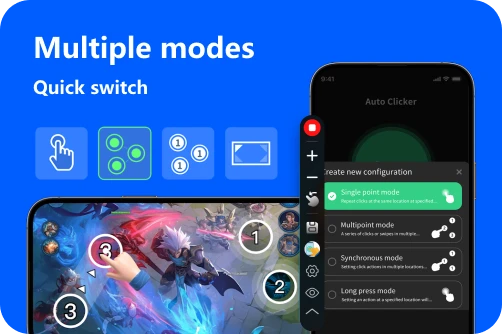
Android users enjoy a robust ecosystem of automation. In 2026, these apps have evolved to include Synchronous Click Patterns and Edge Click Modes, allowing you to automate even the most complex gaming interfaces.
Auto Clicker (True Developers Studio): The reliable gold standard. Optimized for low battery drain in 2026.
Click Assistant: Features 'Curve Swiping' for modern gesture-heavy mobile games.
App Self-Start: Newer tools now support auto-launching the clicker the moment you open a specific game, saving you from manual setup.
---
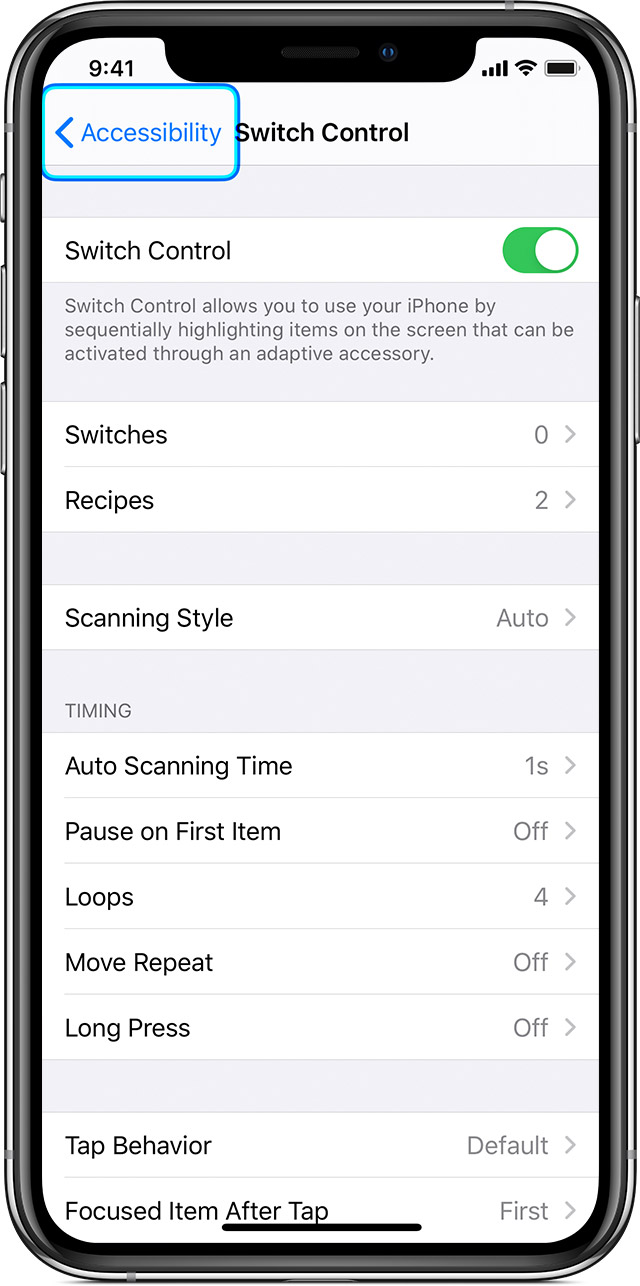
For iPhone users, the strategy remains rooted in Apple's native Switch Control. While the App Store has 'browser-only' clickers, true system-wide automation is only possible through accessibility settings. In 2026, iOS 19/20 has made this process slightly more intuitive.
2. Create: Record a 'Custom Gesture' (a series of taps).
3. Activate: Use the Accessibility Shortcut (triple-click side button) to launch your recipe.
Pro Tip: iOS uses a 'Buffer' system. For every 10 times you tap the screen while Switch Control is active, the iPhone will loop your entire recorded recipe 10 times. This allows you to 'queue' thousands of clicks in seconds.
---
Mobile Gaming: Perfect for Roblox, Clicker Heroes, or Tap Titans. Use a 100ms - 200ms interval to ensure the game registers every hit without lagging.
Social Media Engagement: Automate 'likes' or 'pull-to-refresh' to keep your feed current.
Testing: Developers use multi-finger pinch gestures to test zoom limits in 2026 photography and mapping apps.
---
Modern mobile games use Behavioral AI to detect automation. To keep your account standing healthy, follow these 2026 best practices:
Can you auto click on mobile? Absolutely. Whether you're on the open Android platform or using the high-precision native tools on iOS, mobile automation is a professional way to save time and reduce physical strain. By using trusted software, setting human-like intervals, and understanding platform-specific logic, you can dominate your favorite games and tasks with ease. Just remember to use these tools ethically and always prioritize your device's security!
The answer is a resounding yes. However, the methods vary drastically between Android and iOS. While Android remains the open playground for third-party automation, iOS continues to rely on native accessibility features for secure, high-performance tapping. This 2026 guide breaks down the most stable and effective methods for both platforms.
---
1. Android: The Power of Accessibility Services
Android users enjoy a robust ecosystem of automation. In 2026, these apps have evolved to include Synchronous Click Patterns and Edge Click Modes, allowing you to automate even the most complex gaming interfaces.
How 2026 Android Auto Clickers Work
Modern apps utilize Android's Accessibility Services to draw a floating control panel over your screen. You can drop multiple 'targets' and even set up Combined Click Modes that alternate between taps, long presses, and swipes.Top Android Tools for 2026
---
2. iPhone (iOS): Native Precision with Switch Control
For iPhone users, the strategy remains rooted in Apple's native Switch Control. While the App Store has 'browser-only' clickers, true system-wide automation is only possible through accessibility settings. In 2026, iOS 19/20 has made this process slightly more intuitive.
Setting Up Your 2026 iOS 'Recipe'
1. Path: Settings > Accessibility > Switch Control > Recipes.2. Create: Record a 'Custom Gesture' (a series of taps).
3. Activate: Use the Accessibility Shortcut (triple-click side button) to launch your recipe.
Pro Tip: iOS uses a 'Buffer' system. For every 10 times you tap the screen while Switch Control is active, the iPhone will loop your entire recorded recipe 10 times. This allows you to 'queue' thousands of clicks in seconds.
---
3. Popular Use Cases & Efficiency Tips
---
4. Safety & Account Health in 2026
Modern mobile games use Behavioral AI to detect automation. To keep your account standing healthy, follow these 2026 best practices:
A. Mimic Human Entropy
Avoid perfectly flat intervals. Use tools that offer Gaussian Randomization (e.g., clicking between 95ms and 145ms). This avoids the 'metronome' signature that triggers modern anti-cheat systems.B. Coordinate Jitter
Instead of clicking the exact same pixel, set your targets to click within a small 5x5 pixel radius. This mimics the natural micro-movements of a human finger.C. Hardware Longevity
Continuous clicking keeps your screen active and generates heat. In 2026, we recommend lowering your screen brightness to 10% and using 'Power Saver' mode to protect your battery during long AFK sessions.Conclusion: Master Your Mobile Workflow
Can you auto click on mobile? Absolutely. Whether you're on the open Android platform or using the high-precision native tools on iOS, mobile automation is a professional way to save time and reduce physical strain. By using trusted software, setting human-like intervals, and understanding platform-specific logic, you can dominate your favorite games and tasks with ease. Just remember to use these tools ethically and always prioritize your device's security!