
How to Choose a Good Auto Clicker: The Ultimate Guide for Productivity and Gaming
Let’s be real—tapping your phone screen for hours is the ultimate thumb-killer. Whether you're trying to break records in a mobile clicker game or navigating repetitive app tasks, your hands are usually the bottleneck. This is where the hunt for a good auto clicker for your mobile device begins.
But in a sea of buggy apps and battery-draining scripts, what actually makes a mobile tool 'good'? In this guide, we’ll look at the essential features, safety tips, and how to set up the perfect tapping companion for your smartphone in 2026.
Before we talk tech, let’s talk comfort. Your thumbs aren't built for thousands of taps an hour. Repetitive strain from mobile gaming is a real thing.
a good auto clicker takes the physical hit for you, offering precision and speed that no human can match. Whether you're claiming limited-time rewards in an RPG or automating social media interactions, these tools are more than just 'cheats'—they are essential productivity boosters for your phone.

Not all mobile apps are created equal. A top-tier tool should be powerful but shouldn't slow down your device. Here are the pillars of a great tapping utility:

If you need more than just a single tap, keep an eye out for these:Swipe Gestures: The ability to automate scrolling or complex swipe patterns in apps.
Config Saving: Options to save your specific tap locations for different games so you don't have to re-align them every time.
Screen Protection: Using software automation actually saves your phone's digitizer (the touch-sensitive layer) from unnecessary physical wear and tear.
Once you've grabbed Auto Clicker - Automatic Tap, here’s how to get moving safely:
While a good auto clicker is perfectly legal, use your head:Gaming Rules: Some online competitive mobile games see clickers as an unfair advantage. Always check the game's rules before going AFK in a public match.
Phone Heat: Running an auto clicker for hours can make your phone warm. Try lowering your screen brightness or removing your case for long AFK sessions.
Choosing a good auto clicker for your phone is about finding the sweet spot between speed, safety, and battery life. By sticking with a reputable tool like Auto Clicker - Automatic Tap, you're investing in your productivity and saving your thumbs from the grind. Take a minute to dial in your settings, respect the platforms you're on, and let the automation do the heavy lifting!
But in a sea of buggy apps and battery-draining scripts, what actually makes a mobile tool 'good'? In this guide, we’ll look at the essential features, safety tips, and how to set up the perfect tapping companion for your smartphone in 2026.
Why You Actually Need Mobile Automation
Before we talk tech, let’s talk comfort. Your thumbs aren't built for thousands of taps an hour. Repetitive strain from mobile gaming is a real thing.
a good auto clicker takes the physical hit for you, offering precision and speed that no human can match. Whether you're claiming limited-time rewards in an RPG or automating social media interactions, these tools are more than just 'cheats'—they are essential productivity boosters for your phone.
What Makes a Good Mobile Auto Clicker Stand Out?
Not all mobile apps are created equal. A top-tier tool should be powerful but shouldn't slow down your device. Here are the pillars of a great tapping utility:
1. Security and Battery Efficiency
When you're looking for a good auto clicker, your top priority has to be safety. Plenty of free apps on third-party stores are filled with intrusive ads or malware. A reliable tool like Auto Clicker - Automatic Tap is lightweight, doesn't drain your battery in minutes, and respects your privacy by not asking for unnecessary permissions.2. Multi-Target and Precision Timing
The hallmark of a pro mobile tool is its flexibility. You should be able to set single taps, long presses, or even complex multi-target sequences. a good auto clicker lets you adjust intervals down to the millisecond so you can find the perfect rhythm for any app.3. Floating Control Panel (Ease of Use)
Automation should save you time, not add more steps. A solid mobile clicker features a clean, floating control panel that stays on top of your other apps. You should be able to open Auto Clicker - Automatic Tap and start your first tapping sequence within 30 seconds without digging through deep menus.4. Randomization and Low-Profile Design
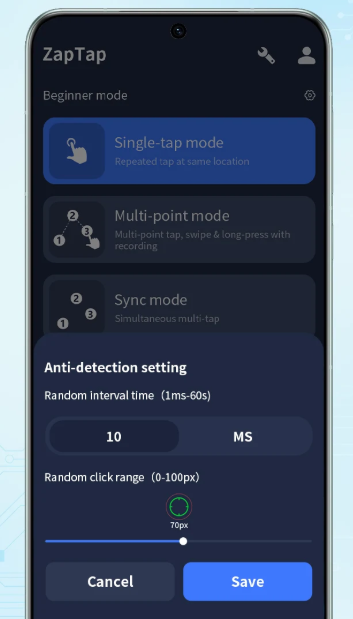
Efficiency is lost if you get kicked for being a bot. A great mobile clicker includes features like 'randomized intervals' and 'randomized offsets.' This mimics human tapping behavior, making it much safer to use in online games or apps with basic bot detection.Advanced Features to Level Up
If you need more than just a single tap, keep an eye out for these:
Step-by-Step: Setting Up Your First Mobile Loop
Once you've grabbed Auto Clicker - Automatic Tap, here’s how to get moving safely:
Step 1: Grant Permissions
Mobile auto clickers usually need 'Accessibility' permissions to perform taps for you. Make sure you're using a trusted app before enabling this in your settings.Step 2: Define Your Speed
Open the settings and set your interval. For gaming, 100 milliseconds is a great starting point. For social media or slower apps, go a bit higher so the phone doesn't lag out.Step 3: Place Your Targets
Use the floating menu to add tap points. Drag the targets exactly over the buttons or areas you want to automate. If you're using multi-target mode, you can even set the order of the taps.Step 4: Test and Adjust
Hit the 'Play' button on the floating panel. Watch it for a minute to make sure it's hitting the right spots. If it's too fast for the game to register, just pause and increase the millisecond delay.Safety First: A Quick Reality Check
While a good auto clicker is perfectly legal, use your head:
Conclusion
Choosing a good auto clicker for your phone is about finding the sweet spot between speed, safety, and battery life. By sticking with a reputable tool like Auto Clicker - Automatic Tap, you're investing in your productivity and saving your thumbs from the grind. Take a minute to dial in your settings, respect the platforms you're on, and let the automation do the heavy lifting!