
Am I Using an Auto Clicker Test? The Ultimate Guide to Verification and Compliance
Let’s be real—if you're using automation, the biggest worry isn't usually 'does it work?' but 'will I get caught?' Whether you're a mobile gamer trying to stay under the radar or a developer stress-testing a new app, you've probably asked yourself: "Am I using an auto clicker test correctly?" or, more importantly, "Is this site going to flag me as a bot?"
In 2026, anti-cheat systems are smarter than ever. Understanding how to verify your clicking patterns and test your setup isn't just for geeks—it's survival for anyone using automation tools on their phone. Here’s the lowdown on how to test your speed and keep your account safe.
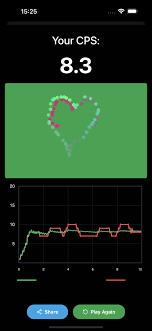
Think of it as a flight check for your automation. An auto clicker test (often called a CPS Test) is a tool that measures your Clicks Per Second. For most of us, it serves two huge purposes:
1. Speed Check: Making sure your app, like Auto Clicker - Automatic Tap, is actually hitting the 20 CPS or 50 CPS you programmed it for.
2. Detection Check: Seeing if your clicks are too perfect. If every single tap happens exactly 100.00ms apart, you’re basically waving a red flag at any anti-bot system.
Automation is everywhere now, but so is the 'ban hammer.' Here’s why you need to run a test before you go AFK:
Ready to see what your clicks look like? Follow these steps using Auto Clicker - Automatic Tap:
If you're asking "Am I using an auto clicker test?" to avoid detection, here is what the 'bad guys' are looking for:
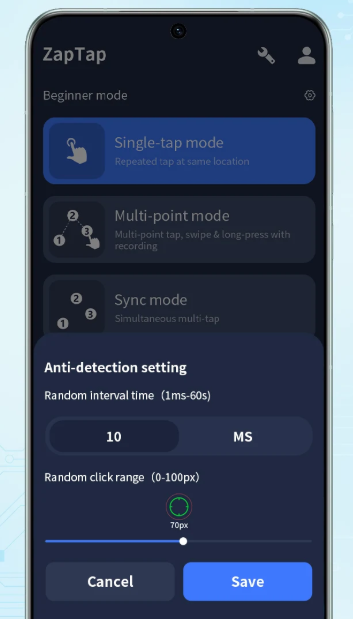
Zero Variance: Real people are messy. Using a tool like Auto Clicker - Automatic Tap with built-in randomization is the best way to bypass basic rhythmic detection.
Static Coordinates: If you hit the exact same pixel 5,000 times, you're a bot. Use 'Target Jitter' to move the tap point slightly each time.
Insane Speeds: Nobody needs 100 CPS. Stick to 10-15 CPS for most tasks; it’s plenty fast and way less likely to trigger a rate limit or IP block.
Running a test is the first step toward responsible automation. By using a solid tool like Auto Clicker - Automatic Tap and verifying it against a CPS test, you can maximize your gains while keeping your phone stable and your accounts safe.
Remember, the goal is to save time, not get banned. Use your test data to refine your intervals, add a bit of human-like randomness, and enjoy a seamless, automated workflow. Now go out there and start clicking—responsibly!
In 2026, anti-cheat systems are smarter than ever. Understanding how to verify your clicking patterns and test your setup isn't just for geeks—it's survival for anyone using automation tools on their phone. Here’s the lowdown on how to test your speed and keep your account safe.
What Exactly is an Auto Clicker Test?
Think of it as a flight check for your automation. An auto clicker test (often called a CPS Test) is a tool that measures your Clicks Per Second. For most of us, it serves two huge purposes:
1. Speed Check: Making sure your app, like Auto Clicker - Automatic Tap, is actually hitting the 20 CPS or 50 CPS you programmed it for.
2. Detection Check: Seeing if your clicks are too perfect. If every single tap happens exactly 100.00ms apart, you’re basically waving a red flag at any anti-bot system.
Why You Should Be Running These Tests
Automation is everywhere now, but so is the 'ban hammer.' Here’s why you need to run a test before you go AFK:
1. Staying 'Human' in Games
Most mobile games hate bots. If your clicking pattern is a perfect straight line on a graph, you’re getting banned. A test helps you see if you need to add some 'jitter' or randomization to your taps to mimic a real human thumb.2. App Stress Testing
If you're building an app, you need to know if it crashes when someone taps the 'Buy' button 100 times a second. Running an auto clicker test lets you push your UI to the limit without breaking your own fingers.3. Finding the 'Sweet Spot'
Every phone has a limit. If you set your clicker to 1ms but your phone can only process 20ms, you're just wasting battery and causing lag. Testing helps you find the fastest speed your device can actually handle.How to Test Your Setup: Step-by-Step
Ready to see what your clicks look like? Follow these steps using Auto Clicker - Automatic Tap:
Step 1: Pick a CPS Test Site
Find a mobile-friendly 'Click Speed Test' website. Look for one that shows a live graph, not just a final score. The graph is where you'll spot the 'too perfect' mechanical patterns.Step 2: Set a Moderate Speed
Open Auto Clicker - Automatic Tap and set it to something reasonable, like 10 clicks per second (100ms interval). This is a safe baseline for most mobile browsers.Step 3: Run a Long Test
Don't just test for 5 seconds. Run the clicker for at least 30 seconds. Short bursts don't show the 'drift' or patterns that anti-cheat systems look for.Step 4: Check for Consistency
If the graph is a perfectly flat line, you need to go back into your settings and enable 'Randomized Intervals.' A 'legit' human click usually fluctuates by 5-10ms.How Systems Detect You (and How to Avoid It)
If you're asking "Am I using an auto clicker test?" to avoid detection, here is what the 'bad guys' are looking for:
Conclusion: Test Smarter, Not Harder
Running a test is the first step toward responsible automation. By using a solid tool like Auto Clicker - Automatic Tap and verifying it against a CPS test, you can maximize your gains while keeping your phone stable and your accounts safe.
Remember, the goal is to save time, not get banned. Use your test data to refine your intervals, add a bit of human-like randomness, and enjoy a seamless, automated workflow. Now go out there and start clicking—responsibly!