
Fixed: Why You Can't Power Your Auto Clicker or Minecraft Click Machine
In the world of Minecraft, efficiency is king. Whether you are grinding experience at a mob farm or fishing for enchanted books, automation is the key to progress. However, many players hit a wall when they realize they can’t power their auto clicker or their in-game click machine has stalled.
In 2026, with the arrival of the 'Spring to Life' update (1.21.5+) and new technical changes in 1.22, automation requires more precision. This guide breaks down why your 'power' is failing and how to get your machines back online.
---

If your software (like OP Auto Clicker 3.0 or Auto Clicker™ from the Microsoft Store) is running but not clicking in-game, it's usually a permission or focus issue.
The Fix: Right-click your clicker and select 'Run as Administrator'.
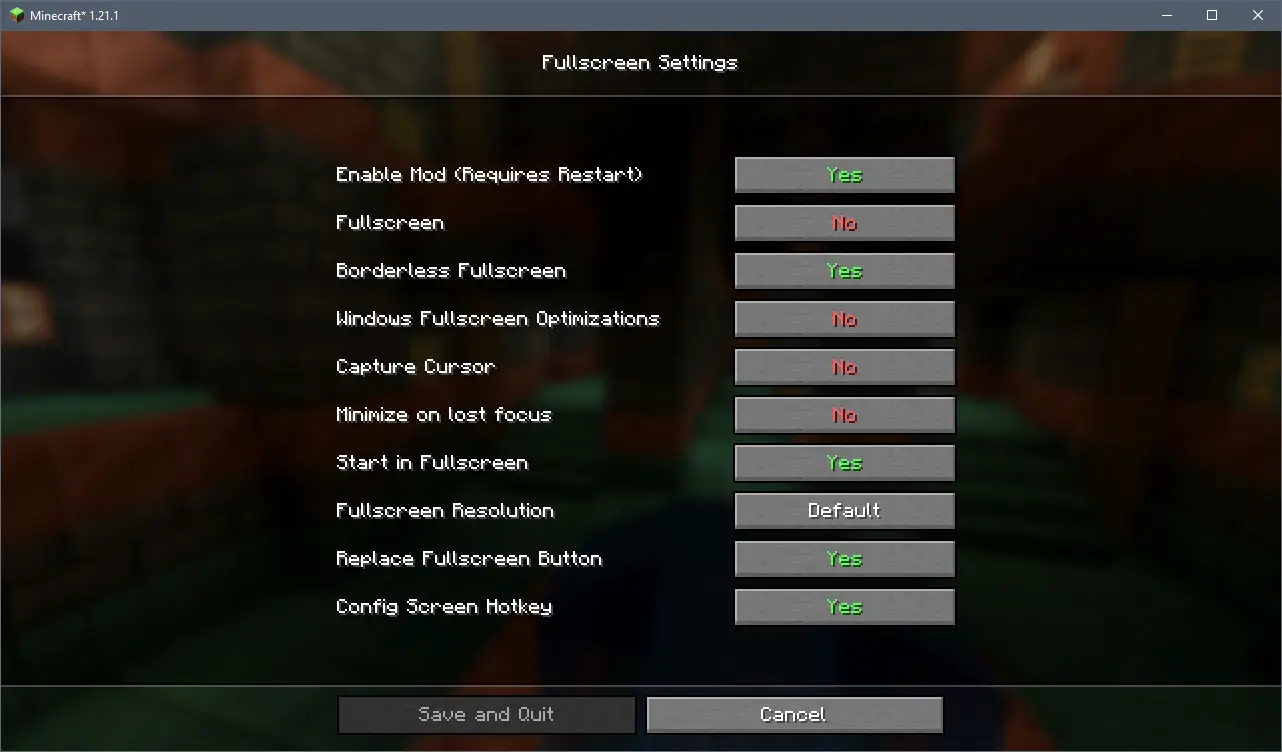
The Fix: Switch to 'Borderless Windowed' mode in Video Settings. This allows the OS to share click 'power' between the tool and the game.
---
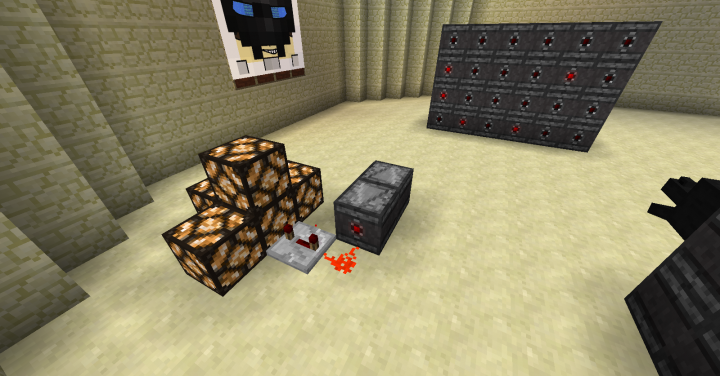
If your in-game Redstone contraption isn't firing, the logic is likely broken by 2026's updated tick mechanics.
The Fix: Replace torch clocks with an Observer Clock (two Observers facing each other). This creates a stable, high-speed pulse that never burns out.
The Fix: Ensure your click machine is within your Spawn Chunks or use a 2026-style 'Ender Pearl' chunk loader to keep the Redstone powered while you're away.
---
On multiplayer servers, the reason you 'can't power' a clicker is often a server-side safety feature.
The Fix: Enable Randomization. Set your clicker to a range (e.g., 8-12 CPS) rather than a flat number. This mimics human clicking and prevents the server from neutralizing your inputs.
The Fix: Add Redstone Repeaters set to 2 or 4 ticks. Slowing down the machine actually makes it more reliable during lag spikes.
---
1. Select a 2026-Ready Tool: Use Auto Clicker™ (Microsoft Store) or a modern open-source alternative from SourceForge. 2. Set the Interval: Avoid '0ms'. Use 80ms to 120ms for the best balance of speed and server stability. 3. Define the Trigger: Use a rarely-used hotkey like 'NumPad 0' to avoid overlapping with Minecraft’s debug (F3) or inventory keys. 4. Crosshair Placement: Ensure you are targeting a block that actually supports the 'Right Click' or 'Left Click' action you're automating.
Whether it's a Redstone burnout or a Windows permission block, 'power' issues in 2026 are almost always a matter of software synchronization or game logic. By switching to Observer clocks and Randomized CPS, you can ensure your click machine stays powered through the longest AFK sessions. Stay updated with the latest Minecraft 1.22 patches, and keep your automation smart and safe!
In 2026, with the arrival of the 'Spring to Life' update (1.21.5+) and new technical changes in 1.22, automation requires more precision. This guide breaks down why your 'power' is failing and how to get your machines back online.
---
1. Software Auto Clicker Won't 'Power' Your Actions
If your software (like OP Auto Clicker 3.0 or Auto Clicker™ from the Microsoft Store) is running but not clicking in-game, it's usually a permission or focus issue.
Administrative Privilege Mismatch
Minecraft launchers (Lunar, Badlion, or Vanilla) often run with high system priority. If your clicker doesn't have the same rank, Windows blocks the 'Power' to send clicks.The Fix: Right-click your clicker and select 'Run as Administrator'.
The 2026 'Input Hijack'
Recent Windows updates and Minecraft's 'Exclusive Fullscreen' mode can capture the mouse entirely. If your clicker isn't working, the game is likely ignoring 'synthetic' inputs.The Fix: Switch to 'Borderless Windowed' mode in Video Settings. This allows the OS to share click 'power' between the tool and the game.
---
2. Redstone Click Machine Troubleshooting
If your in-game Redstone contraption isn't firing, the logic is likely broken by 2026's updated tick mechanics.
Redstone Torch 'Burnout'
If you use a rapid-fire torch clock, it will burn out after 8 rapid pulses. In 2026, burnout logic is stricter to reduce server lag.The Fix: Replace torch clocks with an Observer Clock (two Observers facing each other). This creates a stable, high-speed pulse that never burns out.
Chunk Loading & Random Ticks
As of version 1.21.5, random ticks (like crop growth) now occur within the entire simulation distance, but Redstone still requires the chunk to be fully loaded.The Fix: Ensure your click machine is within your Spawn Chunks or use a 2026-style 'Ender Pearl' chunk loader to keep the Redstone powered while you're away.
---
3. Server-Side 'Power' Blocks
On multiplayer servers, the reason you 'can't power' a clicker is often a server-side safety feature.
Anti-Cheat 'Packet Dropping'
Modern 2026 servers use Heuristic AI. If you click at a constant 20 CPS, the server doesn't just ban you—it silently 'drops' the click packets. Your tool is 'on,' but it has no power to affect the world.The Fix: Enable Randomization. Set your clicker to a range (e.g., 8-12 CPS) rather than a flat number. This mimics human clicking and prevents the server from neutralizing your inputs.
TPS (Ticks Per Second) Lag
If a server is lagging (below 20 TPS), Redstone pulses can skip. A machine that worked yesterday might 'lose power' today because the server can't keep up.The Fix: Add Redstone Repeaters set to 2 or 4 ticks. Slowing down the machine actually makes it more reliable during lag spikes.
---
Step-by-Step: Setting Up a 2026-Safe Click Machine
1. Select a 2026-Ready Tool: Use Auto Clicker™ (Microsoft Store) or a modern open-source alternative from SourceForge. 2. Set the Interval: Avoid '0ms'. Use 80ms to 120ms for the best balance of speed and server stability. 3. Define the Trigger: Use a rarely-used hotkey like 'NumPad 0' to avoid overlapping with Minecraft’s debug (F3) or inventory keys. 4. Crosshair Placement: Ensure you are targeting a block that actually supports the 'Right Click' or 'Left Click' action you're automating.
Conclusion
Whether it's a Redstone burnout or a Windows permission block, 'power' issues in 2026 are almost always a matter of software synchronization or game logic. By switching to Observer clocks and Randomized CPS, you can ensure your click machine stays powered through the longest AFK sessions. Stay updated with the latest Minecraft 1.22 patches, and keep your automation smart and safe!